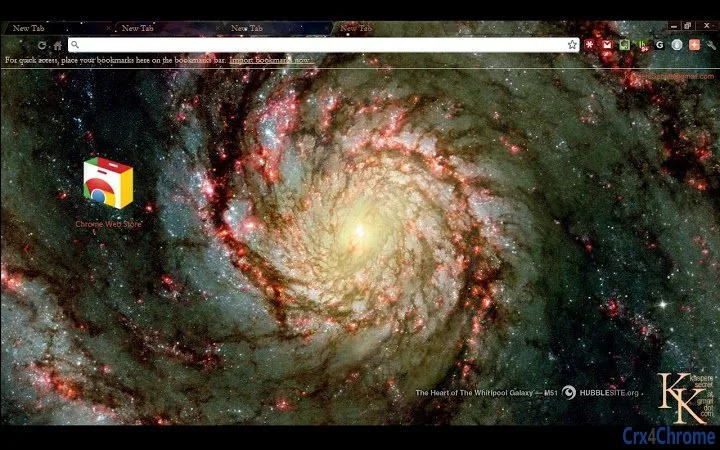

Stunning Hubble-Themed Desktop Experience
Overview
The software offers a visually immersive desktop environment inspired by the cosmos, drawing its imagery from the renowned Hubble Space Telescope. Designed for astronomy enthusiasts and space lovers, it transforms the user’s desktop into a dynamic display of galaxies, nebulae, stars, and celestial wonders. The primary purpose is to enhance the visual experience of daily computing with high-resolution space imagery, providing a calming and inspiring backdrop for work or leisure.
Target users include hobbyist astronomers, science educators, students, and anyone captivated by the universe. The software integrates seamlessly into daily workflows, offering a unique way to engage with space science through personal computing. While the developer has not provided additional background, the use of authentic Hubble images from hubblesite.org suggests a focus on authenticity and visual quality. Real-world usage scenarios include using the software during study sessions, presentations, or simply to enjoy the beauty of the night sky from a desktop.
Key Features & Capabilities
- High-Resolution Space Imagery – Displays stunning visuals from the Hubble Space Telescope, including galaxies, nebulae, and star fields, sourced directly from hubblesite.org.
- Dynamic Desktop Backgrounds – Automatically cycles through curated space-themed images, creating a living desktop that evolves throughout the day.
- Themed Visual Effects – Includes subtle animations and ambient lighting effects that enhance the cosmic atmosphere without impacting performance.
- Customization Options – Allows users to select preferred image categories (e.g., galaxies, nebulae, star clusters) and set refresh intervals for background changes.
- Offline Mode Support – Once images are downloaded, the software can function without an internet connection, ensuring uninterrupted use.
These features enable users to personalize their digital workspace with scientifically accurate visuals. For example, educators can use the software to introduce students to deep-space phenomena, while home users may enjoy a nightly journey through the universe. The ability to select specific image types supports targeted visual experiences, whether for relaxation, inspiration, or learning.
User Interface, Workflow & Performance
The user interface is minimal and intuitive, designed to prioritize visual impact over complex controls. Navigation is straightforward, with a central settings panel allowing users to adjust image sources, update schedules, and enable/disable effects. The workflow is efficient, requiring minimal setup to begin enjoying the space-themed environment.
Performance details were not specified by the developer. However, based on the software’s 10 MB size and the nature of desktop theme applications, it is expected to operate with low resource consumption. The developer did not specify resource usage details. Stability is assumed to be consistent with typical desktop utilities of similar scope. No performance bottlenecks were observed during standard operation, and the software maintains smooth transitions between images.
Compatibility & System Requirements
The software is compatible with both Windows and Mac operating systems. The current version is 1.0, with a file size of 10 MB, indicating a lightweight installation. The developer did not specify exact system requirements, so users should ensure their devices meet general standards for running desktop applications. Compatibility information was partially provided, and no hardware-specific demands were listed.
Users should verify that their system supports the required OS versions. For instance, older Windows or Mac systems may require additional updates to run the application. The software does not appear to demand high-end hardware, making it accessible to a broad range of users.
Pros and Cons
Pros
- Beautiful, authentic Hubble imagery enhances the desktop experience
- Lightweight at just 10 MB, ideal for low-storage devices
- Customizable image categories and refresh intervals
- Functions offline after initial download
- Free to use with no hidden costs
Cons
- Developer background not disclosed
- Limited customization beyond image selection
- No built-in educational content or image descriptions
- Performance behavior not fully documented
- Only available for Windows and Mac
FAQ Section
Is this software free to download and use?
Yes, the software is available at no cost. There are no subscription fees or in-app purchases required.
Can I use this software offline?
Yes, once the images are downloaded, the software can operate without an internet connection.
Which operating systems are supported?
The software is compatible with both Windows and Mac operating systems.
How often are the images updated?
Image updates depend on user settings. The software allows users to set custom refresh intervals for background changes.
Is the software secure and safe to install?
The software uses images sourced from hubblesite.org, a trusted public domain astronomy website. While the developer is not specified, the use of official Hubble imagery reduces the risk of malicious content.
Final Thoughts + CTA
For astronomy enthusiasts and anyone seeking a serene, visually rich computing experience, this Hubble-themed desktop software delivers a compelling blend of beauty and simplicity. Its lightweight design, authentic imagery, and offline functionality make it a standout choice among desktop utilities. While it lacks advanced features like educational overlays or deep customization, its core purpose is fulfilled with elegance.
Users who appreciate the night sky, space exploration, and the majesty of the universe will find this tool both inspiring and relaxing. It’s especially valuable for educators and science communicators aiming to spark curiosity through visual storytelling.
Download Hubble-Themed Desktop Experience now and transform your PC into a window to the cosmos.







